Choose the boundaries, not the surprise
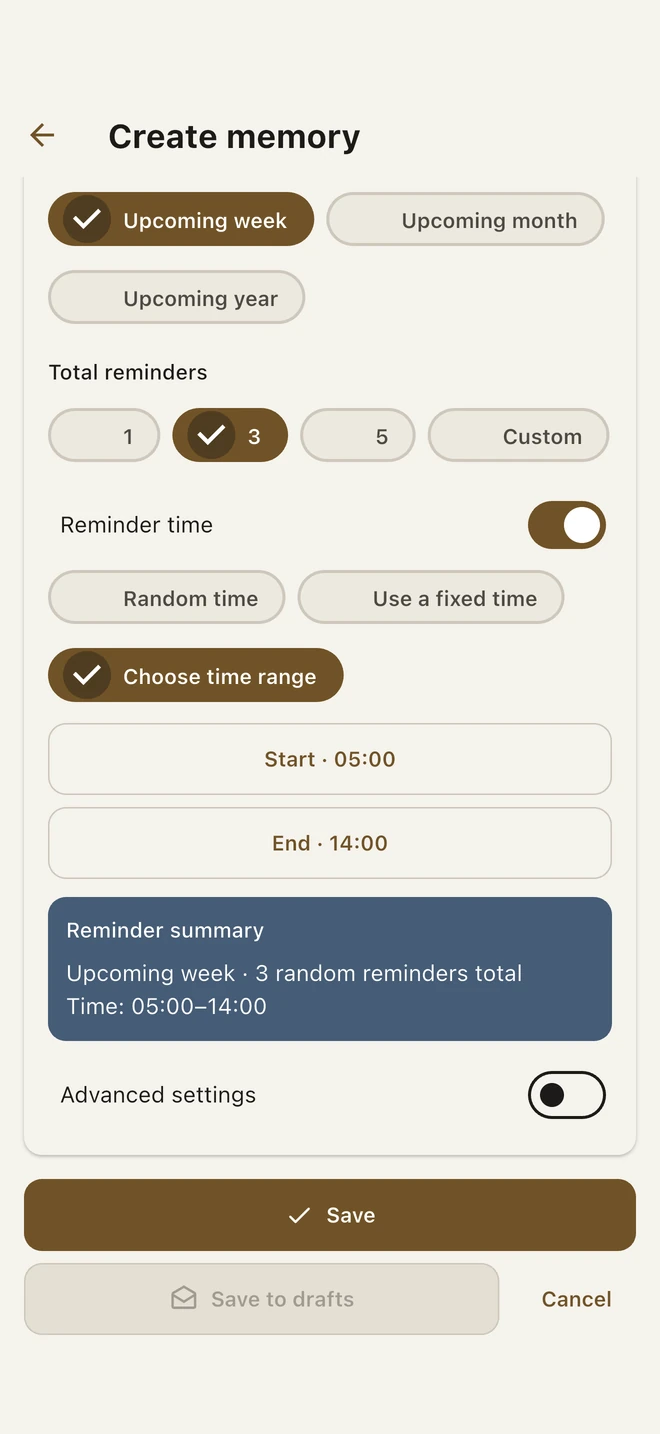
On the compose page, choose the random reminder option, a period and the number of reminders. You can allow random timing across the full 24-hour day, use a fixed clock time or choose a time range.
For example, three reminders within a month between 10:00 and 18:00 define your preferences. They are not a preview of the actual generated delivery dates. Those moments stay hidden in the confirmation.
- Create your memory or open the reminder settings.
- Choose random recurrence, a period and a reminder count.
- Pick the timing mode that suits you; a daytime range can avoid overnight surprises.
- Review the chosen settings and confirm the save.
Random is optional
If you want a predictable rhythm, use the weekly, monthly or yearly choices instead. Detailed settings remain available when the quick controls are not enough.
You can choose timing preferences without being shown the generated random moments. Fixed dates and times that you select yourself are not hidden preferences.
A saved reminder is not a delivery guarantee
Notification permission must be enabled, and delivery depends on the phone’s operating system and notification settings. Saving a memory does not automatically enable notifications.
The feature returns you to content you saved; it does not recover missing memories or promise that every moment of your life will be remembered.